Core action
Risk Check
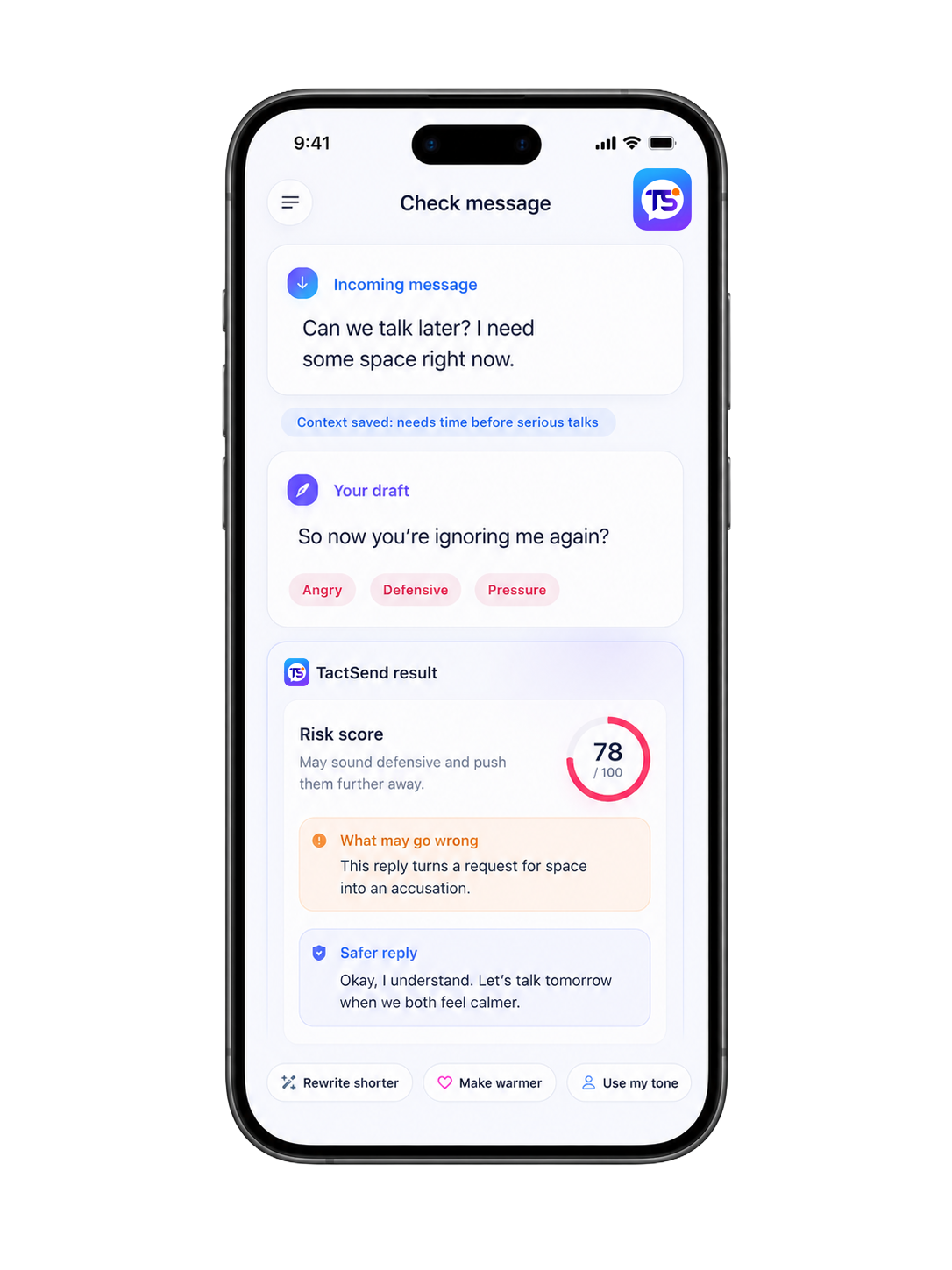
Paste a message and see whether it sounds angry, needy, cold, defensive, passive-aggressive, unclear, or likely to escalate.
- 0–100 risk score
- Tone flags and risk level
- What may go wrong
 TactSend
Get a risk score, a safer rewrite, and person-aware advice to craft messages so clear, respectful, and effective.
TactSend is not a blank chatbot. It is a guided message-safety system built around risk, tone, people, memory, and outcomes.
Paste a message and see whether it sounds angry, needy, cold, defensive, passive-aggressive, unclear, or likely to escalate.
Turn a risky draft into a calmer, clearer version without making it sound robotic or fake.
Save people, triggers, context, patterns, and what usually works so future checks become more personal.
Import a WhatsApp chat export into a profile so TactSend can learn recent tone, triggers, and reply patterns.
Understand what happened in a longer conversation, where tone shifted, and what the safest next step should be.
After sending, save what happened next. TactSend learns which advice helped and which patterns to avoid.
For serious situations, submit context and get a human-reviewed message recommendation.
Submit a case →Roadmap: a browser extension that warns you inside WhatsApp Web, Gmail, and LinkedIn before sending.
Every step is designed to reduce emotional risk, preserve your intent, and keep the message in your voice.
Tell TactSend whether you write short, warm, direct, calm, detailed, emotional, or professional replies.
Save who this is for, what usually triggers conflict, what works, and what you want to avoid.
Paste your draft, copy an incoming message, upload a screenshot, or import a recent WhatsApp chat.
See the risk score, tone flags, what may go wrong, and whether the safest move is to send, soften, or wait.
Choose a calmer, warmer, firmer, shorter, apology, boundary, or professional version in your own tone.
Update the case outcome so future advice for that person becomes smarter and more personal.
No. TactSend is a message-safety and communication tool. It helps you understand tone, risk, and wording. It does not replace therapy, legal advice, or emergency support.
No. TactSend never sends messages to other people. You stay in control. It only helps you review and rewrite before you decide what to do.
Imported chats are used to help create context, trigger maps, and tone summaries for your own communication. Product wording should clearly allow deletion and explain that the other person is not contacted or identified publicly.
Small actions like Risk Check and Rewrite use fewer credits. Deeper actions like Full Chat Analysis or Instant Profile Import use more. Human Review is separate.
Use Human Review when the message is serious: apology, breakup, client dispute, boss conflict, boundary, or an emotionally complex situation where AI alone is not enough.
“It helped me cut a defensive reply down to something calm without sounding fake.”
“The risk score made me pause before sending a client message I probably would have regretted.”
“Person Profiles are the part that makes it feel different. It remembers what usually goes wrong.”
“I used it before a difficult apology. The rewrite was shorter, cleaner, and less needy.”
“The ‘what may go wrong’ section is useful because it explains why a message may land badly.”
“For work messages, it made my replies sound professional without becoming cold.”